
Wikoo - Voice Chat Party&Games
Asif InfotechCommunication
4.05.00 Reviews
- Version
- 1.8.10
- Installs
- 50.00K
- Age Rating
- Mature 17+
Screenshots
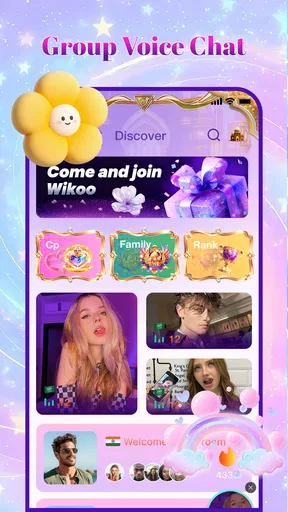



Our Review of Wikoo - Voice Chat Party&Games
 Analysis by Appyee
I approached Wikoo - Voice Chat Party&Games as a communication app first and a casual entertainment space second. Its basic idea is easy to understand: join voice party rooms, spend time with other people, and use games as a reason to keep the conversation moving. That makes it different from a conventional messenger, where the main goal is usually sending a text, sharing a file, or making a private call.
My first impression was that Wikoo is most useful when I treat it as a place to drop into rather than another inbox that needs constant maintenance. The app is free to install, although it includes optional purchases priced from around fifty cents to a little over five dollars per item. It is marked for mature users aged seventeen and above, so I would not recommend handing it to a younger teenager simply because the interface looks social and informal.
How I use Wikoo in a normal day
The most practical workflow is simple. I open the app when I have time for a live conversation, look for a voice room that matches my mood, and listen before speaking. That short pause matters. In a text-based community, I can scan several messages quickly; in a voice room, the atmosphere is easier to understand by hearing how people interact. I find it better to observe briefly, then decide whether to join in, move to another room, or leave without forcing a conversation.
This makes Wikoo a reasonable fit for someone who enjoys meeting unfamiliar people but does not want to prepare a formal profile or arrange a call in advance. It can also work for a small group of friends looking for an easy shared activity. Instead of opening a separate voice service and then searching for a game elsewhere, the app puts conversation and casual play in the same environment.
A realistic example is an evening when I am waiting for a friend to finish work. I can enter a room, listen while doing something else, and take part when the conversation becomes interesting. If the room is too noisy or the topic is not for me, I can leave without having invested much time. That low-commitment pattern is one of the strongest reasons to try this app.
Where the room format helps
Voice changes the social experience. It is quicker than typing and can make a group feel more immediate, especially during a game. A joke, hesitation, or change in tone carries information that a short message may lose. At the same time, voice rooms demand more attention than text chat. I cannot skim everything later with the same ease, and joining while I am in a loud place makes the experience less comfortable.
For that reason, I would use Wikoo with headphones when possible and keep my first contributions short. A clear greeting or a direct answer is usually more effective than speaking continuously. New users may feel pressure to perform in a room, but the better habit is to participate at a pace that feels natural.
Checking the basic controls before settling in
One of the most useful habits is to inspect the available room and conversation controls before becoming active. I want to know how to silence my own microphone, adjust the listening volume, and leave quickly. These are ordinary actions, but in a live room they are more important than they seem. A phone call can be paused or ended with little confusion; a busy party room can change quickly.
I also pay attention to how much of my time a room is consuming. Wikoo encourages spontaneous participation, but that does not mean every room deserves a long stay. I use a short trial period: listen, speak once if appropriate, and then decide whether the group suits me. This prevents the common mistake of remaining in an unhelpful room simply because I have already joined it.
Settings and habits that make the experience smoother
The app becomes easier to manage when I separate social choices from technical ones. Before joining a longer session, I check my connection, lower background noise, and make sure the phone is not about to switch into a distracting state. These steps are not special Wikoo features; they are practical preparation for any live voice service, but they matter here because the app depends heavily on real-time interaction.
I recommend starting with a conservative approach to microphone use. Keeping the microphone muted until I have something useful to add reduces accidental sounds and makes the room more pleasant for everyone. When I do speak, I try to use a steady distance from the phone rather than moving it around. That small adjustment often improves clarity more than speaking louder.
Notifications deserve attention as well. A social app can become tiring if every invitation or room activity interrupts work, study, or sleep. I prefer to decide when I am available instead of letting the app dictate my schedule. If I want a relaxed session, I open Wikoo deliberately; if I am busy, I leave it closed. This is especially important for users who already have several messaging apps competing for attention.
There is also a privacy-minded reason to be selective. A voice room is not the same as a private conversation with a close friend. I avoid sharing personal contact information, precise location details, account credentials, or anything I would not want repeated by someone I have just met. The mature age label is a reminder to use adult judgement, not a guarantee that every room will match my expectations.
How I handle in-app purchases
Because Wikoo is free but offers optional purchases, I treat spending as a separate decision from enjoying the basic service. I would not buy anything immediately after joining, especially before understanding how the room culture works or whether I will return regularly. A useful rule is to use the free experience first and only consider a purchase when I can explain exactly what it adds to my own use.
This approach is particularly sensible for casual users. If I only open the app occasionally to listen or play, a purchase may not improve the experience enough to justify it. Regular participants may see more value in optional extras, but the decision should come from a repeated habit rather than pressure from a lively room or another participant.
Small shortcuts that improve repeat sessions
Experienced use is less about discovering a secret button and more about repeating a reliable routine. I keep a mental shortlist of the kinds of rooms I enjoy, enter quietly, check the sound, and leave quickly when the conversation is not a good fit. That is faster than trying to make every room work.
I also avoid opening the app without knowing what I want from the session. Sometimes I want background conversation, sometimes a game, and sometimes a more active exchange. Choosing one of those intentions before entering helps me recognize a poor match early. It also prevents me from jumping between rooms without actually enjoying any of them.
For friend groups, the most efficient pattern is to agree on a simple plan outside the app first: who is joining, how long the session should last, and whether the focus is conversation or play. Wikoo can then serve as the shared space rather than the place where everyone tries to organize from scratch. This reduces awkward waiting and makes the party feel more purposeful.
For solo users, I find the opposite approach works better. There is no need to force a long session. A brief visit can still be worthwhile if I find an interesting room or meet someone with a similar sense of humor. The app’s value comes from the quality of the interaction, not from staying online for a fixed amount of time.
Using the games without losing the social side
The games are most appealing when they support conversation rather than replace it. I would choose them as an icebreaker or as a shared activity after a room has already developed some energy. If the game becomes the only focus, Wikoo starts to compete with dedicated game apps, which usually provide deeper systems, clearer progression, or more specialized controls.
That trade-off is important. Wikoo is convenient because communication and casual play are close together, but convenience is not the same as depth. I would recommend it to someone who wants a light activity while talking, not to a player searching for a serious competitive experience or a large standalone game library.
Limits that experienced users should understand
The biggest limitation is the unpredictability of public voice spaces. The quality of a session depends on who is present, how well people behave, and whether the room is active enough to sustain conversation. A polished interface cannot solve a quiet room, a group that talks over newcomers, or a discussion that simply does not match my interests.
Voice communication also creates accessibility and comfort concerns. Someone who prefers reading, cannot speak freely, or often uses a phone in public may find a text-first app more practical. Wikoo is not the obvious choice for people who need searchable written records of every conversation. It is designed around being present in the moment, and that is both its appeal and its restriction.
I would also avoid using it as a replacement for private communication with people I already know well. Traditional messaging apps are usually better for precise plans, personal details, file sharing, and conversations that need to be revisited later. Wikoo is strongest when the goal is spontaneous social contact, not dependable record keeping.
The mature rating should influence how families approach the app. Parents looking for a controlled, child-friendly social environment should choose a service built specifically for that purpose. The fact that Wikoo is easy to enter does not remove the need for boundaries, careful sharing, and supervision where appropriate.
Another limitation is that the free model may not suit everyone equally. Optional purchases can be harmless when ignored, but users who dislike any form of in-app spending may prefer a simpler communication tool. I would also be cautious about spending merely to feel more visible in a room. Social attention is temporary, and buying something does not guarantee a better conversation.
How Wikoo compares with familiar alternatives
Compared with ordinary messaging apps, Wikoo feels more spontaneous and less private. It is better for discovering a live social atmosphere and worse for sending a clear message that someone can read later. Compared with a standard voice-call app, it offers a more open party-room feeling and less control over exactly who is involved.
Compared with dedicated gaming platforms, it is lighter and more conversation-centered. The games provide a reason to interact, but they are not the main reason I would install it. Compared with text-based communities, Wikoo can create faster rapport through voice, yet it also asks users to be more present and more careful about what they reveal aloud.
That comparison points to a clear audience. I think Wikoo suits adults who enjoy casual group conversation, want occasional games, and are comfortable entering social spaces without knowing everyone beforehand. It is less suitable for someone seeking private calls, structured communities, advanced gaming features, or a quiet app that stays out of the way.
What the current release tells me
Wikoo comes from Asif Infotech, and the current version is 1.8.10. It requires Android 8.0 or newer, which makes it accessible to many users with older supported phones while still leaving very old devices outside its range. The app has passed fifty thousand installs and holds a 4.0 average from more than seven hundred ratings, so there is enough public interest to suggest that the concept connects with a real audience, even though those figures do not guarantee that every room will be active or enjoyable.
I would judge it by consistency rather than popularity alone. A communication app lives or dies by the people available when I open it. If I repeatedly find rooms that fit my interests, Wikoo becomes a handy part of my social routine. If the available conversations feel empty or uncomfortable, the install count will not change my experience.
My verdict after using it as a social tool
Wikoo is at its best when I use it intentionally: join a suitable room, keep the microphone under control, try a casual game, and leave when the session stops being enjoyable. That workflow makes the app feel relaxed instead of demanding. It also prevents the common problems of noisy audio, aimless room-hopping, and spending money before knowing whether the service fits me.
I would recommend it to an adult who likes meeting people through live conversation and wants games to make those first interactions less awkward. I would skip it if my priority were private messaging, detailed written history, serious gaming, or a tightly moderated environment designed for younger users. A conventional messenger or dedicated gaming service would be the better tool in those situations.
My final opinion is positive but measured. Wikoo offers a convenient blend of voice rooms and casual play, and its free entry makes it easy to test without committing money. Its real value depends on finding rooms with a welcoming rhythm, so I would approach it with realistic expectations rather than treating it as a guaranteed source of friends. Used with sensible boundaries and a repeatable routine, it can be a pleasant way to turn a spare half-hour into a live social experience.
Verdict
Strengths of Wikoo - Voice Chat Party&Games
- Easy voice-chat setup for casual conversations and group hangouts.
- Party games add variety beyond standard voice-room chatting.
- Room discovery makes it simple to find active communities quickly.
- Interactive features help conversations feel more lively than text chat.
- Useful for meeting people with similar interests from different regions.
Limitations of Wikoo - Voice Chat Party&Games
- Public rooms may include loud, immature, or inappropriate conversations.
- User activity and room quality can vary considerably by time of day.
- Voice chat can consume noticeable mobile data and battery power.
- Some features or content may depend on in-app purchases or virtual items.
- Privacy can be a concern when speaking with unfamiliar users online.
Similar Picks in This Category
View All
Google Messages
Google LLC4.6

Gmail
Google LLC4.1

Google Meet
Google LLC4.4

Google Chrome
Google LLC4.1

WhatsApp Messenger
WhatsApp LLC4.6

Carrier Services
Google LLC4.2
Frequently Asked Questions
What is Wikoo - Voice Chat Party&Games?
Wikoo is a social entertainment app built around live voice conversations, party rooms, and casual games. After opening the app, users can explore public or themed rooms, join group discussions, meet other members, and participate in interactive activities. It is designed more for real-time socializing than for private messaging, so the experience depends heavily on the communities and rooms available in your region.
Do I need to create an account to use Wikoo?
An account is generally required to access the main social features, including joining voice rooms, creating a profile, interacting with other users, and keeping track of your activity. During registration, the app may request basic information such as a nickname, profile image, age, or login details. Before signing up, review the permissions and privacy settings, and avoid sharing sensitive personal information publicly.
Is Wikoo free to download and use?
Wikoo can typically be downloaded without an upfront charge, and users may access some voice rooms, games, and community features for free. However, social apps of this type can include optional virtual items, gifts, premium functions, or in-app purchases. Check the current pricing shown in the app store and inside Wikoo, especially if children may use the device or if payment methods are saved.
Is Wikoo safe for children and teenagers?
Because Wikoo focuses on live voice chat and interaction with strangers, parents should use caution before allowing younger users to join. Public rooms may contain conversations or behavior that are not suitable for every age group. Review the app’s age rating, privacy controls, blocking and reporting tools, and community guidelines. Children should never reveal their address, school, phone number, passwords, or other private details.
What permissions and internet connection does Wikoo require?
Wikoo needs a reliable internet connection for live voice rooms, games, messages, and other real-time features. Depending on how you use it, the app may request access to the microphone, notifications, and possibly photos or other device functions for profile customization. Grant only permissions that make sense for the features you want, and remember that voice chat can consume mobile data and battery during longer sessions.
